




BOM List (Bill of material)
A bill of materials, known as a BOM list, details every item required for constructing a particular product. This inventory assists in overseeing all parts as they are bought and put together.
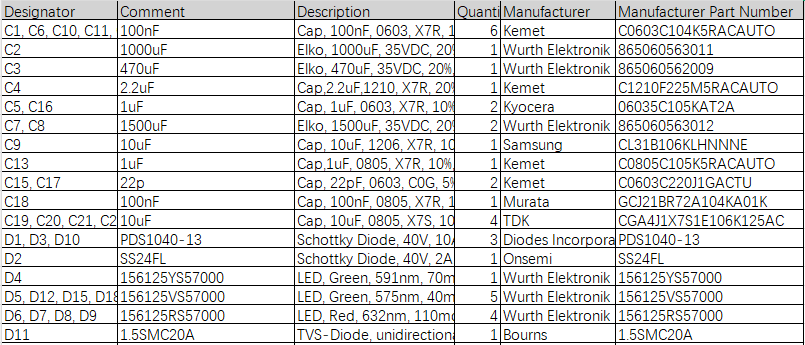
A PCB BOM functions as the authoritative document for assembling PCB. This comprehensive record holds various details about the components, including quantity, manufacturer part number, reference designators, supplier name, footprint(size), specifications, etc
Note – Specify type, specification, tolerance, etc. For example, 100nF 80% -20% 50CV
Position number – Marks the position of components on the circuit board. For example, R201, R20, C100, U1
Please do not use case sensitivity to specify your different components. We will convert all letters to uppercase during production. If you happen to use case distinction in different parts, please correct it.
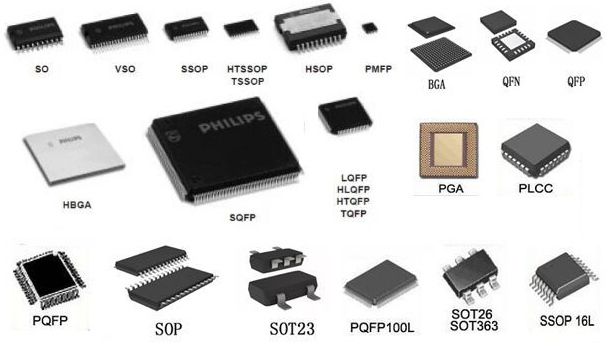
Packaging – Component packaging. (Example: 0402, 0805, SSP-8)
Recommended document formats: csv,.xls and.xlsx.
What are the steps for preparing a bill of materials?
Can produce it by hand, keying in all the required data into Excel with all informations, But to save time and reduce human errors, you can rely on specialized software that includes a feature to automatically produce your BOM. Among the most frequently used programs are KiCad, Altium Designer, and Allegro
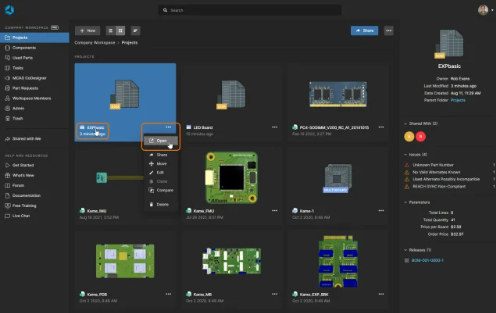
Each manufacturers often recommend a particular layout. Consequently, when preparing the list, the designer should use the same template suggested by PCBA company
Just upload Gerber files, BOM list files and design files, and Suga team will provide a complete quotation to you!
How do I create a BOM list for my PCB?
You can create it by exporting it from your ECAD software (such as Altium or KiCad), organizing it in a spreadsheet or BOM tool, and then adding missing details like supplier information and part numbers. Be sure to double-check everything before sharing.
What is the difference between eBOM and mBOM?
eBOM (Engineering Bill of Materials) is used during the design phase. It focuses on technical details and prototyping.
mBOM (Manufacturing Bill of Materials) is used for production and includes supplier data, quantities, and assembly instructions.
Can I use Excel to manage a BOM list?
Yes, many people use Excel to manage BOMs, especially for smaller projects. For larger or more complex builds, dedicated BOM software or cloud-based tools can help with version control, automation, and team collaboration.
How often should I update the BOM?
You should update the BOM whenever there is a design change—even minor edits. Keeping the BOM up-to-date helps avoid confusion, incorrect orders, and delays during production.
Can I include mechanical parts in a PCB BOM?
Yes! While a PCB BOM mainly lists electronic components, it is a good practice to include mechanical parts such as screws, brackets, and enclosures—especially if they are part of the final assembled product.